Configure ports
To enable communication you must expose Besu ports appropriately. The following shows an example port configuration for a Besu node on AWS.
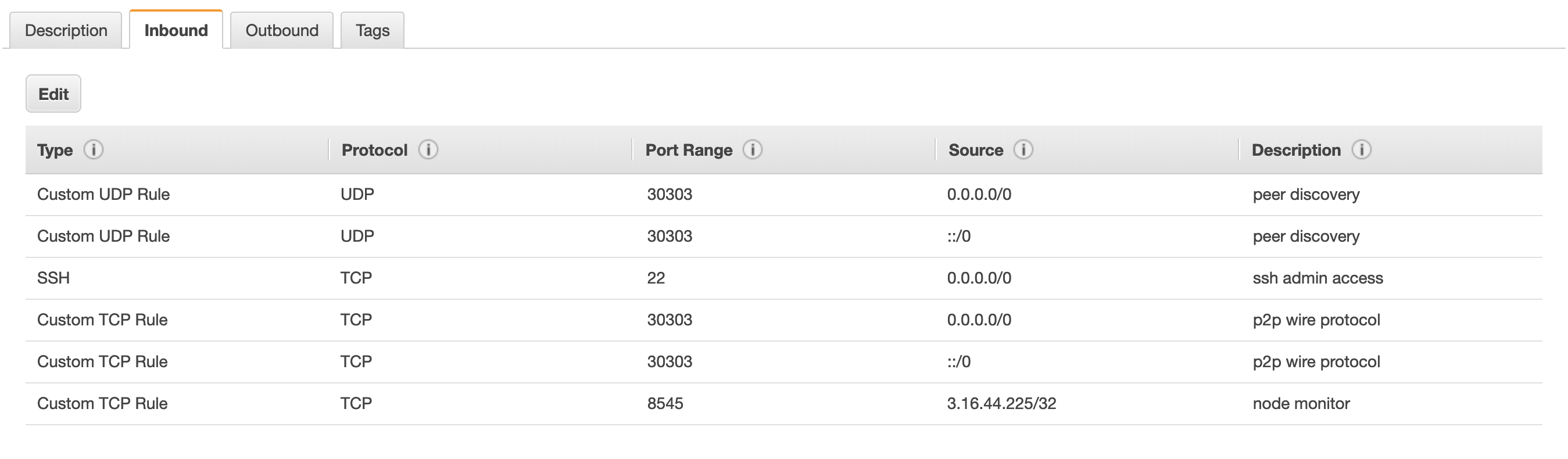
When running Besu from the Docker image, expose ports.
If your nodes are running in AWS, ensure you have appropriate SecurityGroups to allow access to the required ports.
Besu supports UPnP for home or small office environments where a wireless router or modem provides NAT isolation.
P2P networking
To enable peer discovery, the P2P UDP port must be open for inbound connections.
Specify the P2P port using the --p2p-port or
--p2p-port-ipv6 option.
To use IPv6 addresses (discovery v5), set the experimental option --Xv5-discovery-enabled to true.
We also recommend opening the P2P TCP port for inbound connections. This is not strictly required because Besu attempts to open outbound TCP connections. But if no nodes on the network are accepting inbound TCP connections, nodes cannot communicate.
To specify the P2P host, set the --p2p-host or --p2p-host-ipv6 option.
By default, peer discovery listens on all available network interfaces.
If the device Besu is running on must bind to a specific network interface, specify the interface using the --p2p-interface or
--p2p-interface-ipv6 option.
JSON-RPC API
To enable access to the JSON-RPC API, open the HTTP JSON-RPC and WebSockets JSON-RPC ports to the intended users of the JSON-RPC API on TCP.
Specify the HTTP and WebSockets JSON-RPC ports using the --rpc-http-port and --rpc-ws-port options. The defaults are 8545 and 8546.
Metrics
To enable Prometheus to access Besu, open the metrics port or metrics push port to Prometheus or the Prometheus push gateway on TCP.
Specify the ports for Prometheus and Prometheus push gateway using the --metrics-port and --metrics-push-port options. The defaults are 9545 and 9001.